Kam-SyncCamera to Cloud in Real-Time
Connect your professional camera directly to Kamero via FTP. Photos upload automatically as you shoot - guests can view their photos within seconds of capture.
Why Photographers Love Kam-Sync
Transform your live event photography workflow. Instant backup, instant delivery, instant impact.
Instant Cloud Backup
Never lose photos to corrupted memory cards or lost equipment. Every shot is backed up instantly to the cloud.
Multi-Camera Support
Up to 10 Kam-Sync accounts for team photography. Each camera syncs to the same or different albums.
Remote Album Switching
Change target albums from your dashboard without touching the camera. Switch from ceremony to reception seamlessly.
Review Before Publishing
Photos upload to a hidden Kam-Sync Album first. Curate and approve before guests can see them.
Duplicate Detection
Smart MD5 checksum detection prevents duplicate uploads. Re-upload the same photo? We'll skip it automatically.
AI Face Recognition
Uploaded photos are instantly indexed by our AI. Guests find their photos with a selfie in seconds.
Get Started in 4 Easy Steps
One-time camera configuration, then shoot anywhere and deliver instantly.
Create Kam-Sync Account
One-time setup in your dashboard
- Log in to your Kamero dashboard
- Navigate to 'Kam-Sync' section
- Create FTP account with camera name
- Get your unique credentials
Configure Your Camera
Enter FTP settings once
- Open camera's Network/FTP settings
- Enter server: ftp.kamero.ai
- Add your username & password
- Set mode to Passive (PASV)
Select Event & Album
Choose where photos go
- Select target event from dashboard
- Choose Kam-Sync Album for review
- Or upload directly to public album
- Switch albums remotely anytime
Shoot & Deliver
Photos upload automatically
- Connect camera to WiFi
- Start shooting - photos auto-upload
- Review in Kam-Sync Album
- Publish to guests instantly
How Kam-Sync Works
From camera to cloud to guests - see the complete workflow at a glance.
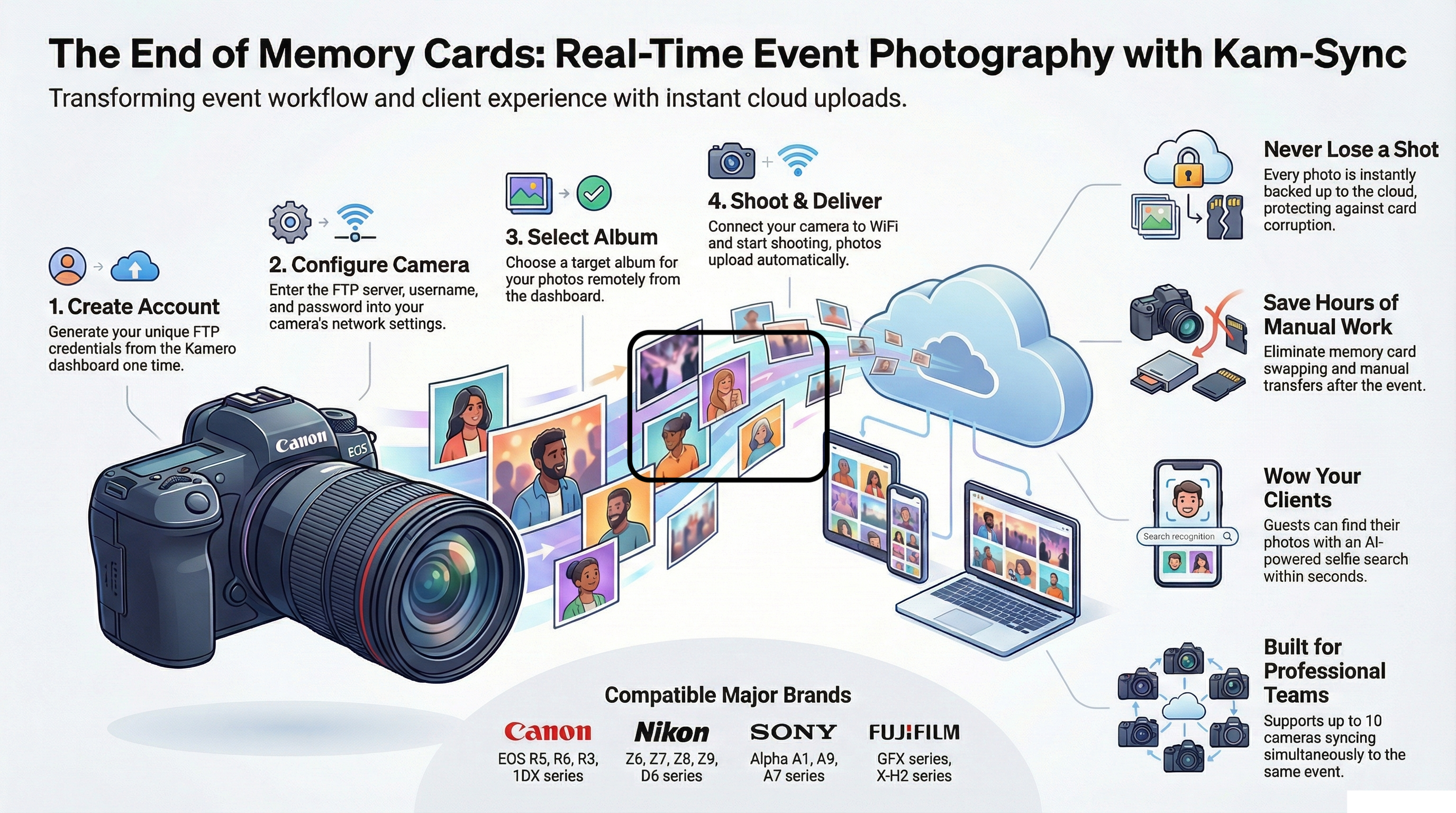
Works With Your Camera
Kam-Sync supports any FTP-enabled professional camera. Check your camera manual for "FTP Transfer" or "Network Settings".
Canon
EOS R5, R6, R3, 1DX series
Nikon
Z6, Z7, Z8, Z9, D6
Sony
Alpha A1, A9, A7 series
Fujifilm
GFX series, X-H2
Don't see your camera? Any camera with FTP transfer capability works with Kam-Sync.
Simple FTP Credentials
We generate easy-to-type 5-digit usernames and passwords - perfect for entering on your camera's small screen. Configure once, shoot forever.
FTP Server
ftp.kamero.ai, port 21, server type FTP (not SFTP or FTPS)
Passive Mode
Use PASV mode for reliable uploads through firewalls
Your Kam-Sync Credentials
Choose Your Upload Quality
Balance speed and quality based on your event needs.
Standard Quality
Optimized for fast delivery
- Fast upload speed
- Web-optimized quality
- Perfect for quick sharing
Original Quality
Full resolution preserved
- Original file quality
- RAW support
- For print & archive
Perfect for High-Value Events
In events where every second counts, Kam-Sync is your most valuable player.

Weddings
Surprise guests with same-day photos they can share instantly on social media.

Award Ceremonies
Instantly share winner moments and maximize exposure for sponsors and press.

Corporate Events
Upload speaker and attendee photos in real-time to boost engagement.

Sports Events
Capture and share action shots instantly for media and fans.

Music Festivals
Deliver crowd and artist shots to social channels as the event unfolds.

Marathons
Share thrilling sports moments and runner highlights instantly with fans.

Political Events
Campaign moments and rally photos delivered instantly for social media impact.
Manage Everything From One Place
Create accounts, switch albums, monitor uploads - all without touching your camera.
Kam-Sync Dashboard
Canon R5 - Main
Sarah & John Wedding
Nikon Z8 - Stage
Sarah & John Wedding
Sony A1 - Portraits
Sarah & John Wedding
Change target album without touching your camera
Why Photographers Choose Kam-Sync
Never Lose a Shot
Every photo is backed up to the cloud instantly. No more worrying about corrupted memory cards or lost equipment.
Save Hours of Work
No more manual transfers or memory card swapping. Photos are ready for delivery before you even leave the venue.
Wow Your Clients
Deliver same-day photos that guests can share immediately. Create unforgettable experiences that generate referrals.
Frequently Asked Questions
Everything you need to know about Kam-Sync.
What is Kam-Sync?
Learn how Kam-Sync transforms your event photography workflow with real-time photo delivery.
Ready to Transform Your Workflow?
Join thousands of photographers delivering photos in real-time. Set up Kam-Sync in minutes and start wowing your clients.
No credit card required • Included with your Kamero subscription
About Kam-Sync: Real-Time Camera to Cloud Photo Upload
Kam-Sync is Kamero's revolutionary feature that transforms live event photography. By connecting your professional camera directly to Kamero via FTP, photos upload automatically as you shoot - enabling instant photo delivery to event guests.
Whether you're shooting weddings, sports events, concerts, or corporate gatherings, Kam-Sync eliminates the traditional workflow of memory card transfers and manual uploads. Photos appear in your Kamero album within seconds of capture, ready for AI-powered face recognition and instant guest delivery.
With support for up to 10 simultaneous camera accounts, remote album switching, and built-in duplicate detection, Kam-Sync is the professional photographer's secret weapon for delivering unforgettable same-day photo experiences.