Kamero subscription plans, credits and renewals explained
There are two ways to pay for Kamero. A subscription gives you a yearly upload limit you can spread across unlimited events. Credits are a prepaid wallet you spend on single event packs, event renewals and face recognition. This guide covers both, plus renewals, autopay, payment methods in India and abroad, and where to find your invoices.
Where to find it
- Subscription in the top menu opens your plan, your upload use and the plan list.
- Home shows your Available Credits card, a short Subscription Details card and, lower down, the event packs you can buy.
- The Orders icon (the list icon in the top bar) opens My Orders, where every payment and invoice is listed.
New to the dashboard? Start with Getting started with the Kamero dashboard.
Read your subscription card
Click Subscription. The card at the top shows your plan, its status and when it ends.
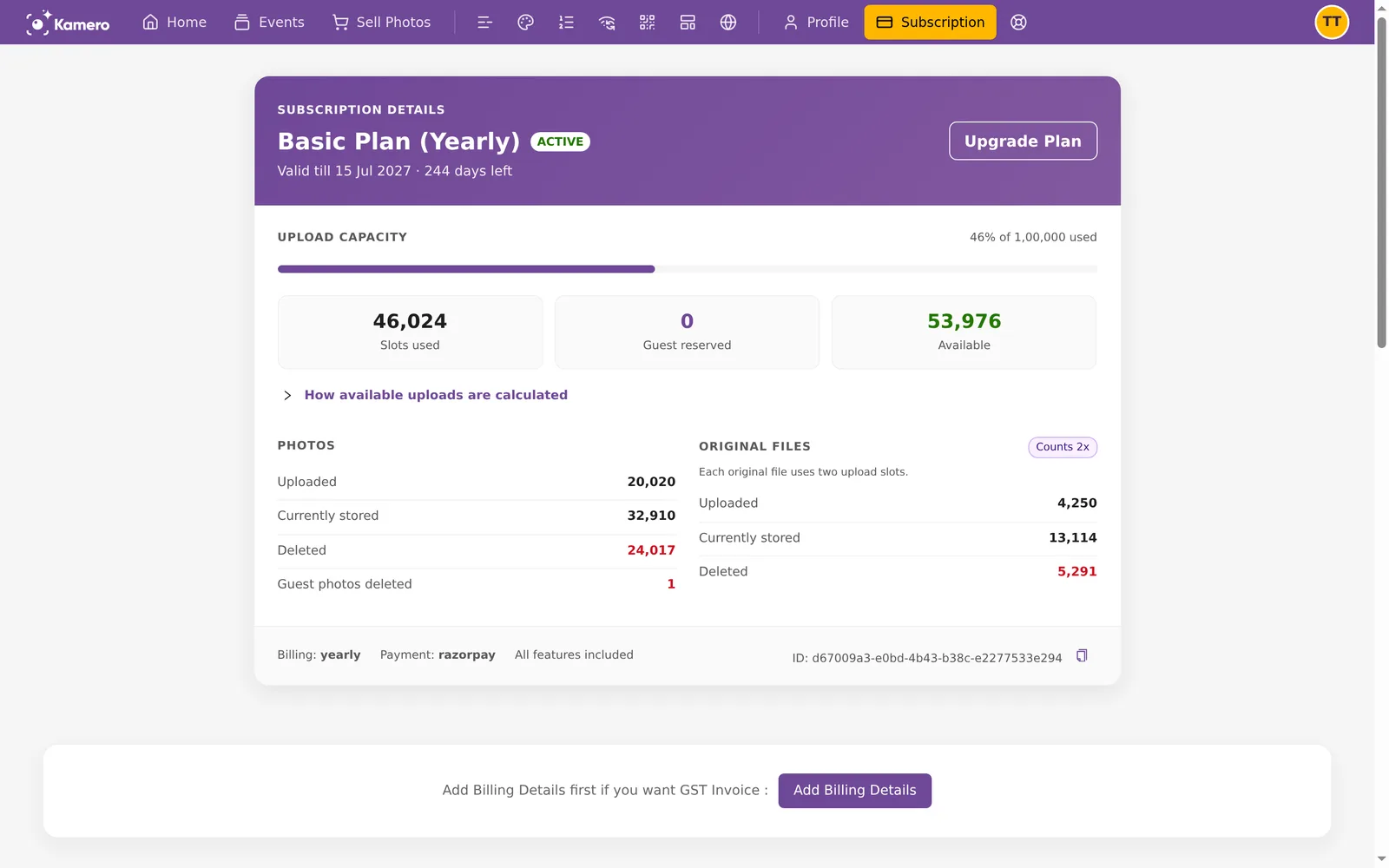
- Status chip: ACTIVE, or EXPIRING IN 17D (or however many days are left) once the end date is close.
- Valid till: the last day of your plan and the days left.
- UPLOAD CAPACITY: a bar with three numbers. Slots used is what counts against your limit. Guest reserved is space held for guest uploads. Available is what you can still upload this year.
- PHOTOS and ORIGINAL FILES: how many you uploaded, how many are stored now and how many were deleted. Original files carry a Counts 2x tag because each one uses two upload slots.
- The footer shows the billing cycle, the payment gateway, "All features included" and your subscription ID, which you can copy for support.
How the available number is worked out
Click How available uploads are calculated to see the sum step by step.
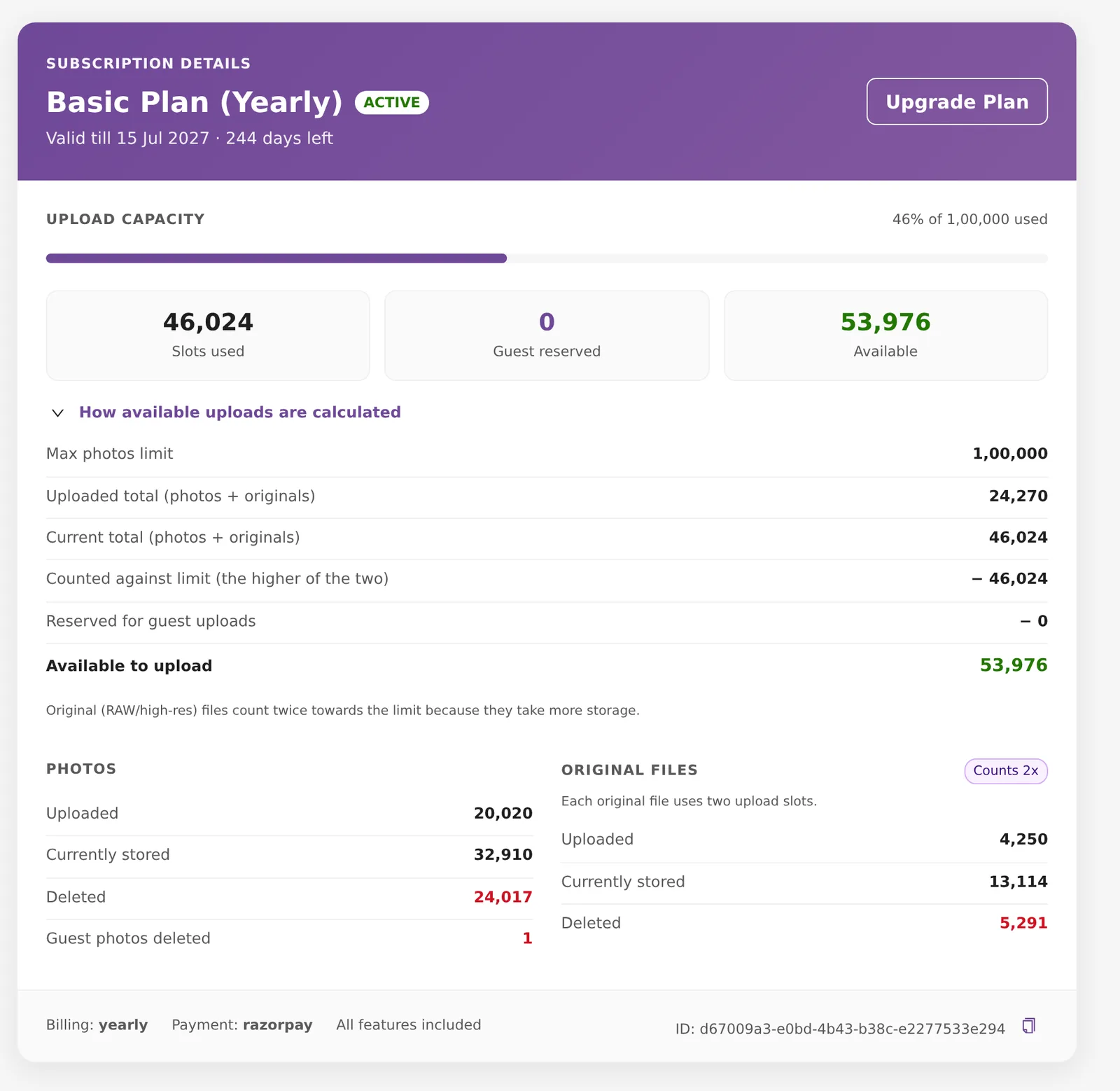
Kamero adds up your photos and original files (originals at two each). It takes the higher of the "uploaded" and "currently stored" totals, so deleting photos does not give the space back within the same year. Space reserved for guest uploads is then taken off what is left. A worked example, and when the limit resets, are in How the subscription upload limit works.
The plans and what each includes
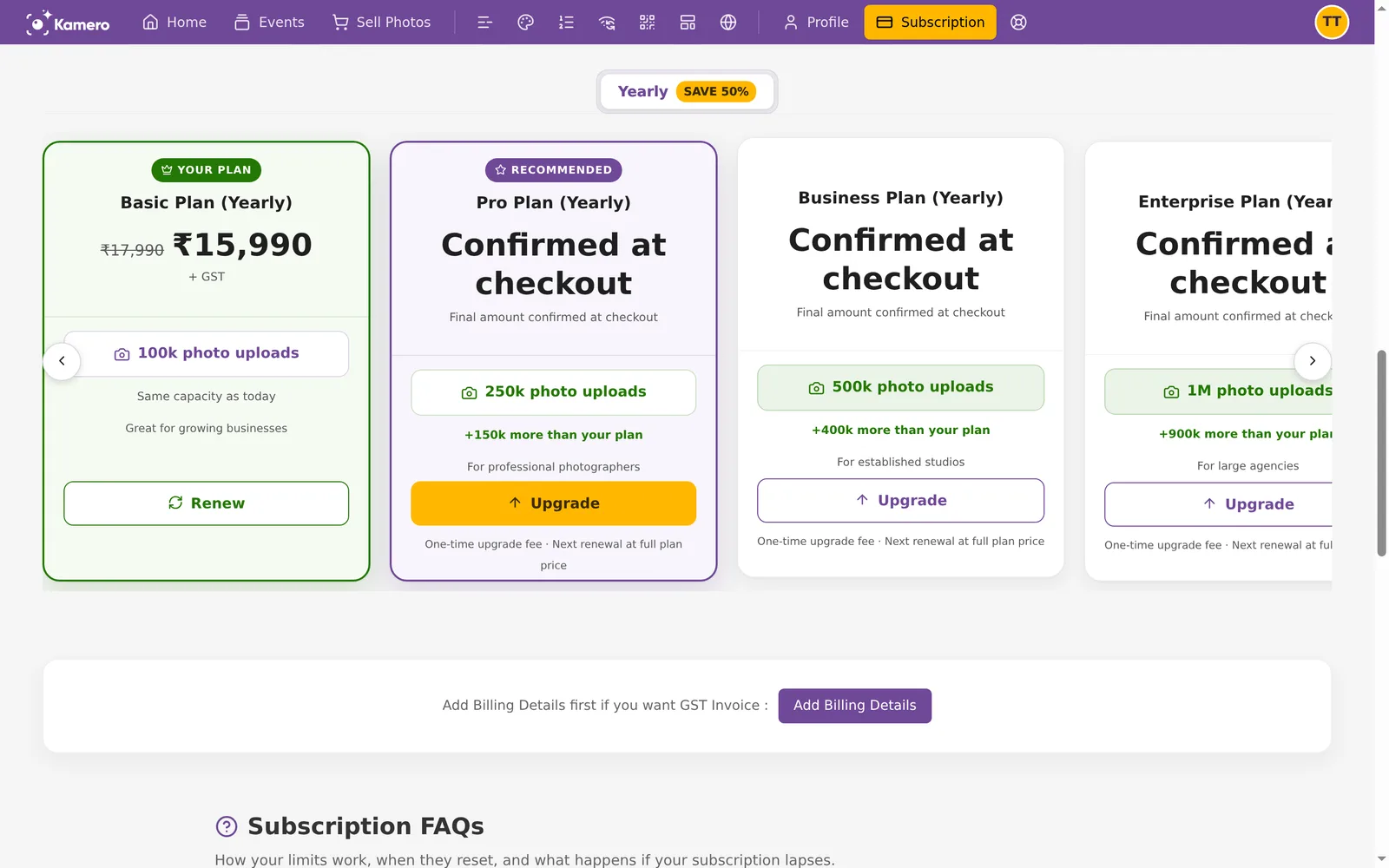
Scroll down the Subscription page to see the plans. Use the arrows to move through the cards.
Yearly prices in India (before 18% GST):
- Starter: 50,000 uploads a year, ₹8,490
- Basic: 1,00,000 uploads a year, ₹15,990
- Pro: 2,50,000 uploads a year, ₹38,490
- Business: 5,00,000 uploads a year, ₹57,990
- Enterprise: 10,00,000 uploads a year, ₹84,990 (₹1,00,288 with GST)
Every plan includes every feature: standard and original file uploads, Kam-Sync, guest uploads, web galleries and apps, Common QR, unlimited guests and events, guest registration, download control, face recognition with unlimited searches, photo shortlisting, selling photos, full branding, customisable profiles, enquiries and event analytics. You only choose how much upload capacity you need.
The tabs above the cards set how you pay. The Yearly tab carries a SAVE 50% badge. Whichever you pick, the plan itself still runs for a year.
- Yearly: every plan, in INR and USD.
- Quarterly: in India only for Starter (₹5,730) and Basic (₹11,410), before GST. Outside India for every plan.
- Monthly: outside India only.
For a custom plan or an offline payment, contact support. To compare a subscription with single event packs, see Event pack or subscription.
The tags on the cards tell you where you stand:
- YOUR PLAN marks the plan you are on. Its button is Renew.
- RECOMMENDED marks the best-value plan above yours.
- Higher plans show how much more space you get (for example "+150k more than your plan") and an Upgrade button.
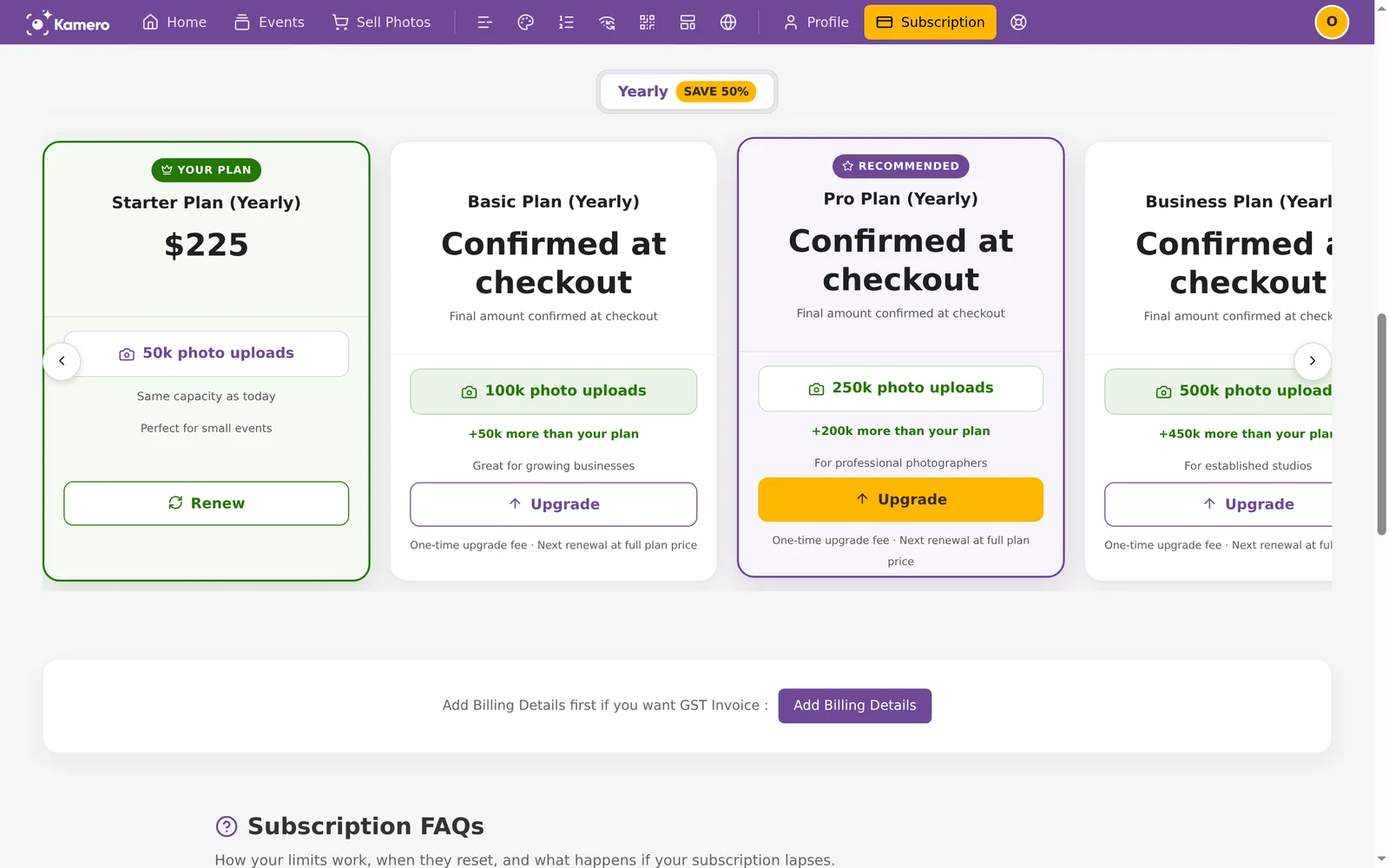
Outside India the same plans are priced in US dollars: Starter $225, Basic $420, Pro $950, Business $1,200 and Enterprise $1,800 a year.
Payment methods by country
- India (INR): Razorpay (card, UPI, net banking) or PhonePe. Prices show "+ GST" and 18% GST is added at checkout.
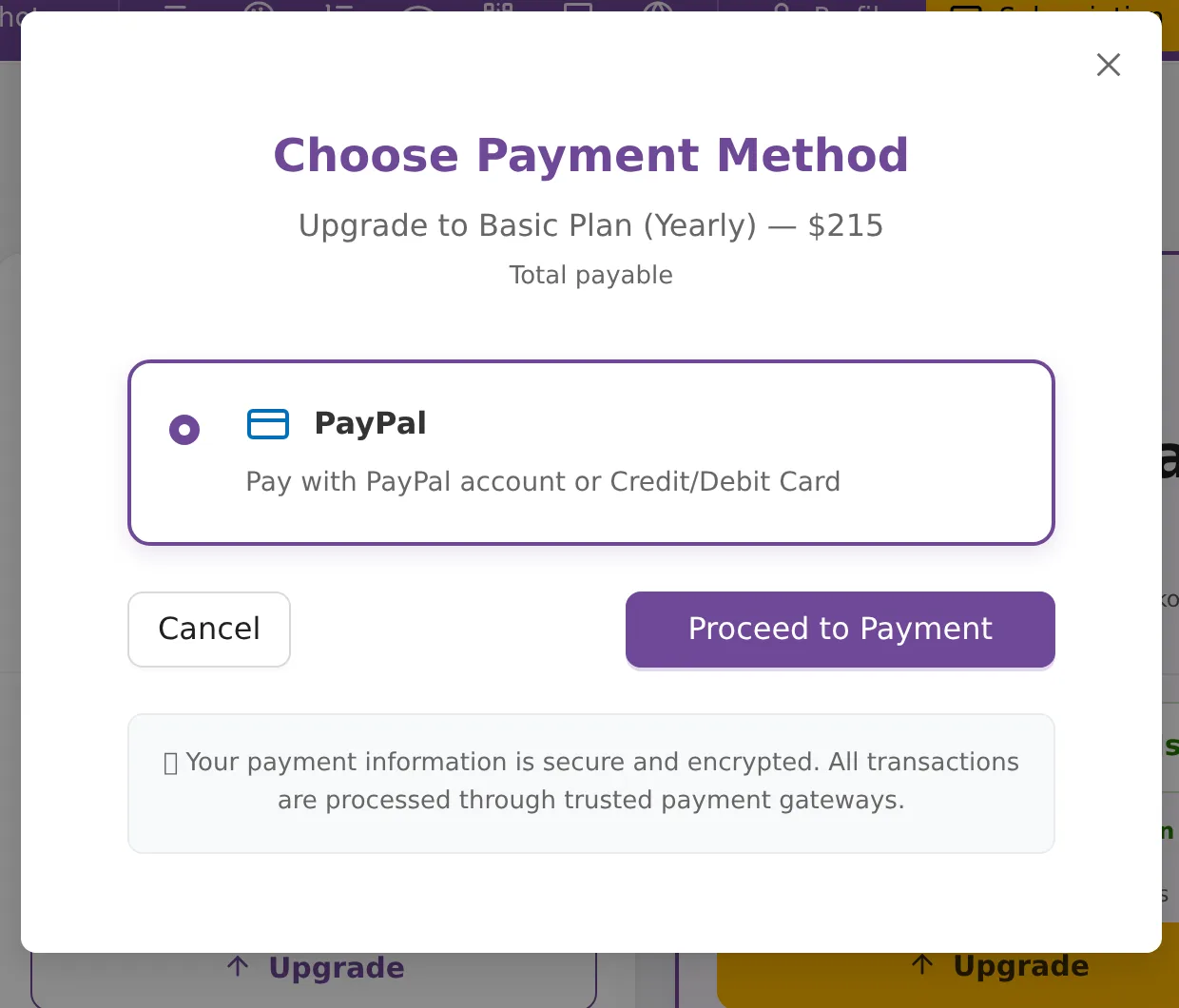
- Outside India (USD): PayPal, with a PayPal account or a credit or debit card. No GST is added.
The country you are in when you pay decides which one you see.
Renew your plan
When your plan is close to its end date, the card turns to EXPIRING IN and shows a Subscription Expiring Soon alert.
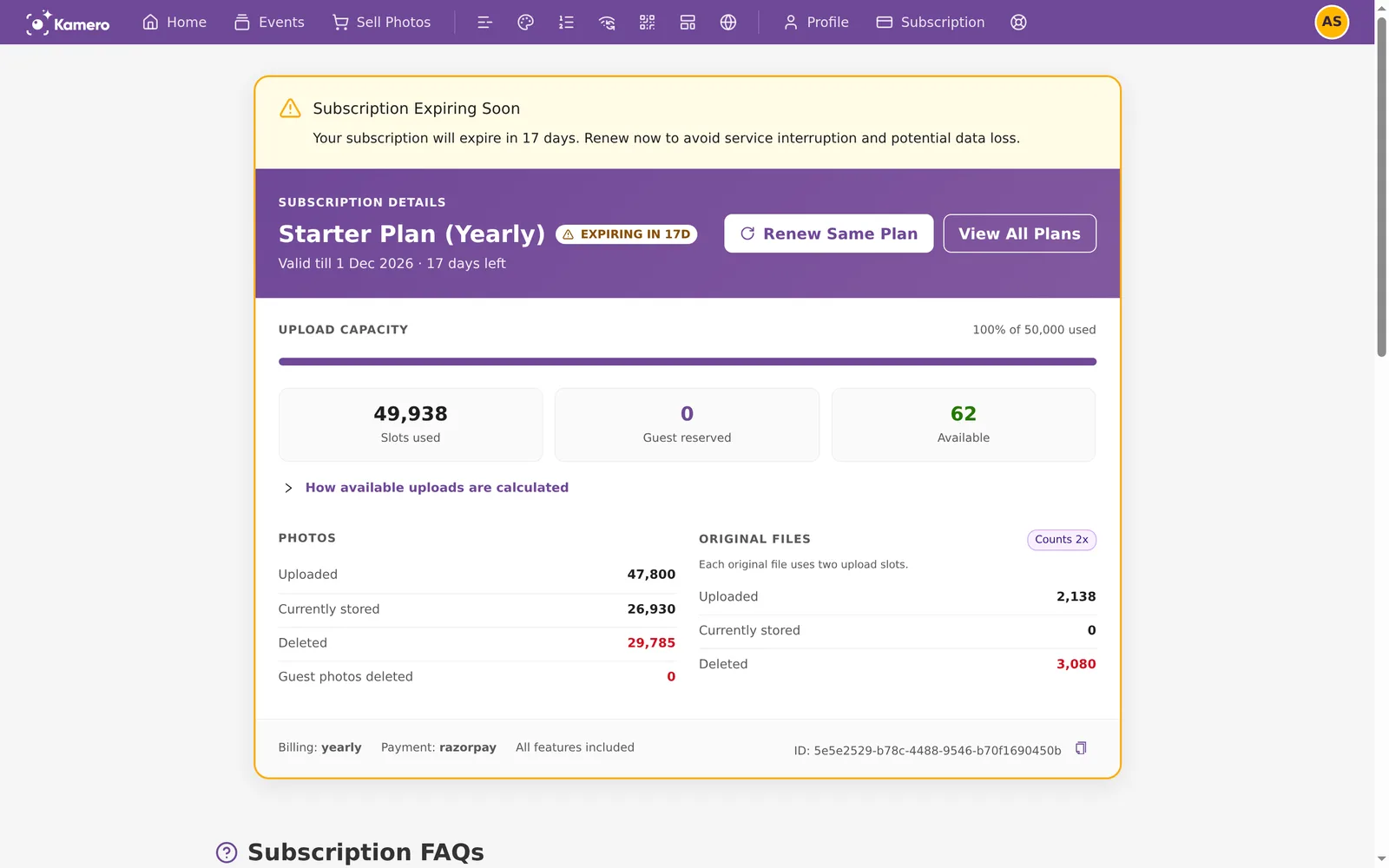
- Click Renew Same Plan. To change plan as you renew, click View All Plans and pick one.
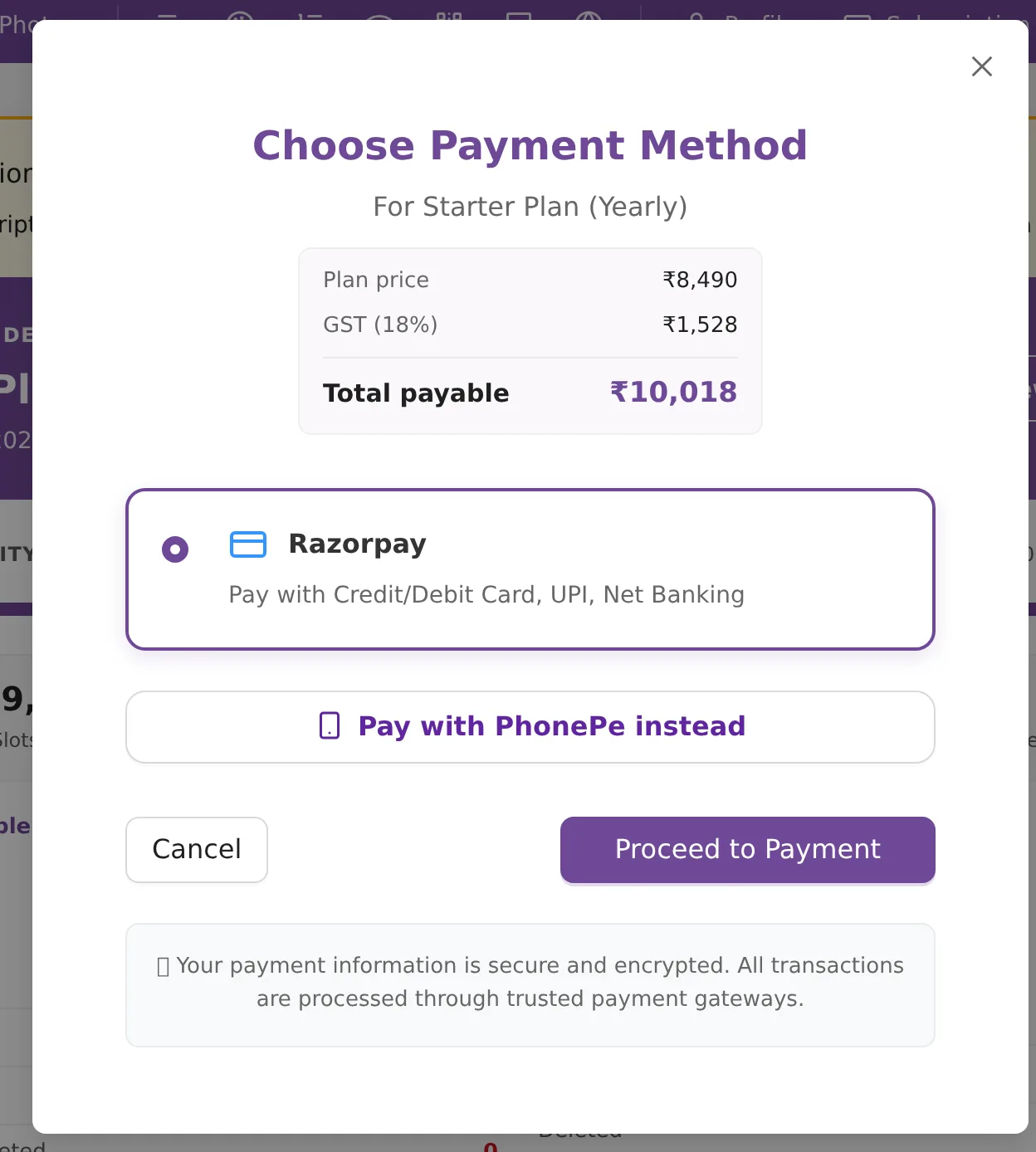
- The Choose Payment Method window opens with the plan price, the 18% GST and the Total payable. For Starter yearly that is ₹8,490 + ₹1,528 = ₹10,018.
- Razorpay is selected. To pay with PhonePe, turn on Pay with PhonePe instead.
- Click Proceed to Payment and finish the payment on the gateway page.
If the plan does expire, access to your subscription events is suspended straight away. Kamero may archive (remove) an event 7 days after it expires; renew before then to be safe. See Event validity and expiry.
Upgrade to a bigger plan
If you are running out of space, the Subscription page shows an Upgrade Your Plan banner above the plans.
- Click Upgrade Plan on your subscription card, or Upgrade on a higher plan.
- The payment window shows the one-time upgrade amount: the difference between the two plan prices, plus a one-time fee of ₹1,000 in India or $20 outside India. In India 18% GST is added. If the new plan does not cost more than yours, the charge is 20% of the new plan's price, plus the fee.
- Click Proceed to Payment.
Your renewal date stays the same. The next renewal is charged at the full price of the new plan. The billing tabs you see depend on how you pay now: yearly subscribers see only Yearly, quarterly subscribers see Yearly and Quarterly, and monthly subscribers see all three.
There is no downgrade. Smaller plans are not offered, and if you renew onto a smaller plan you keep your bigger limit.
Autopay
Paying by Razorpay or PayPal sets up autopay, so the next payment is taken for you. Monthly payments continue until you cancel, quarterly payments run for 4 cycles, and yearly runs for 1. PhonePe is a one-time payment with no autopay, so you renew by hand each time.
An upgrade is charged through the autopay you already have. A renewal follows the country you are in when it is due.
Buy credits or redeem a coupon
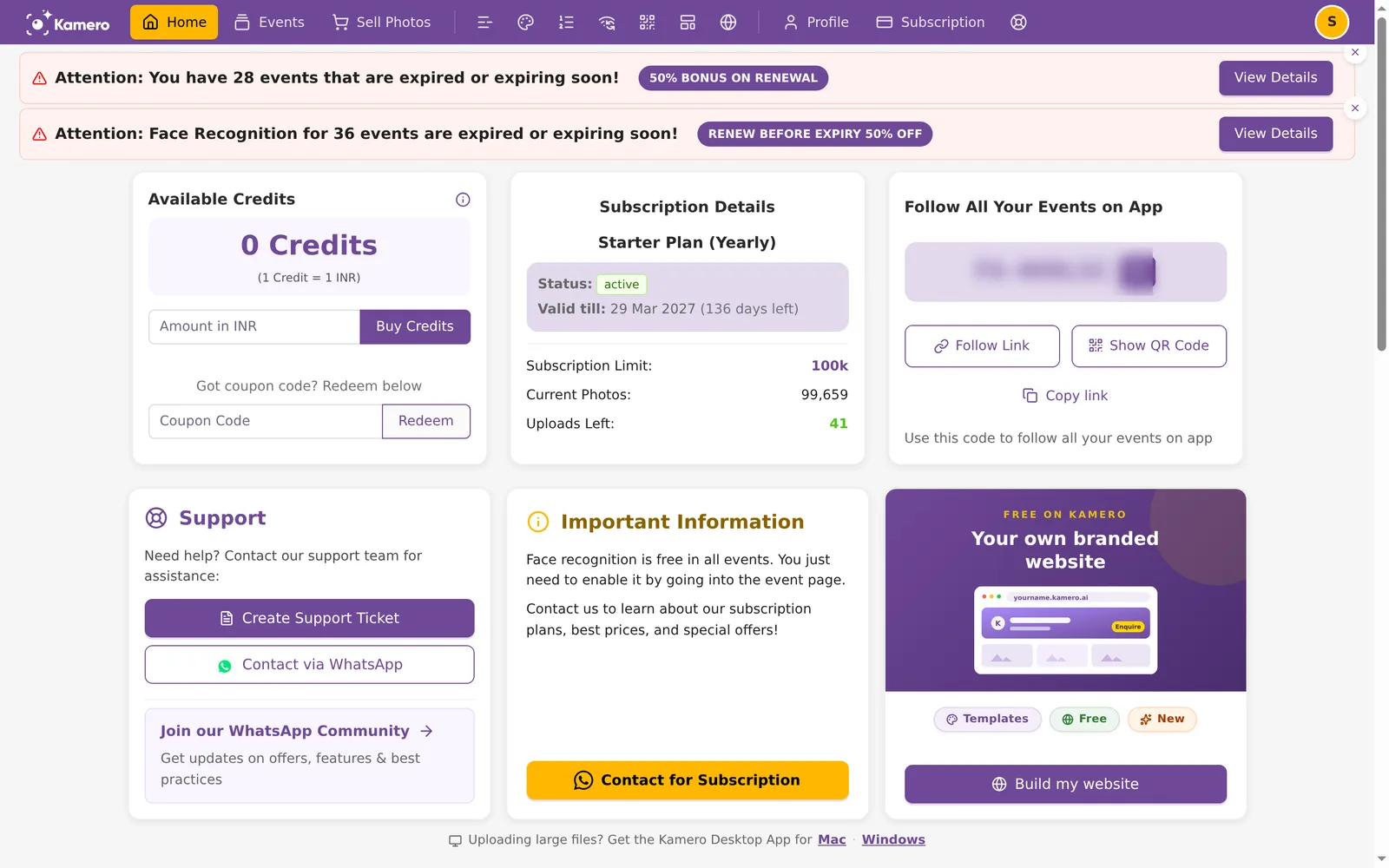
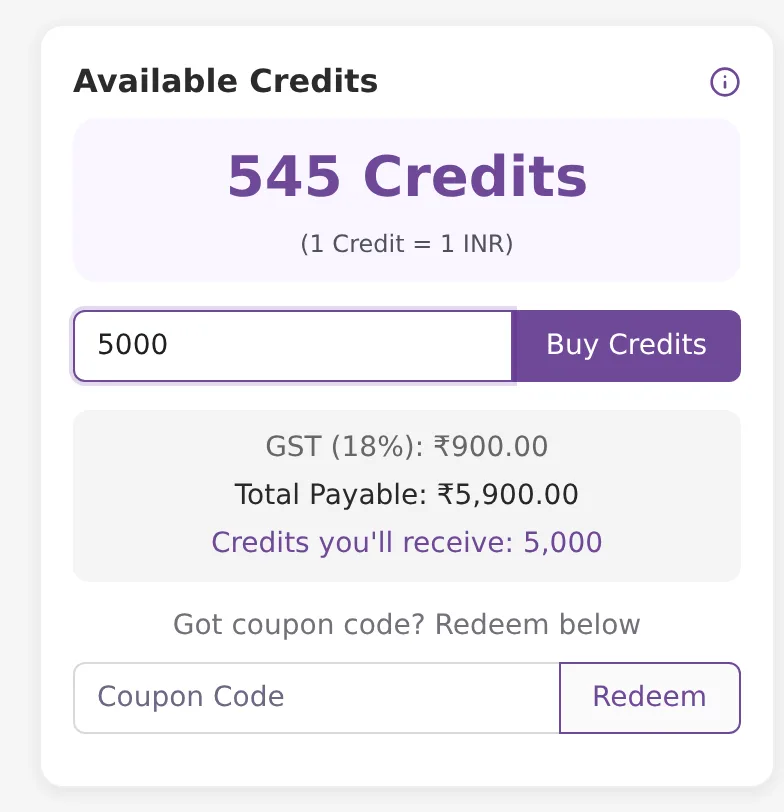
Credits live in the Available Credits card on Home. Use them for event packs, event renewals and face recognition.
Buy credits in India
- Type an amount in Amount in INR. One credit is one rupee.
- Check the summary that appears. For 5,000 it shows GST (18%) ₹900.00, Total Payable ₹5,900.00 and 5,000 credits.
- Click Buy Credits. The minimum is ₹100, and payment is by PhonePe.
Buy credits outside India
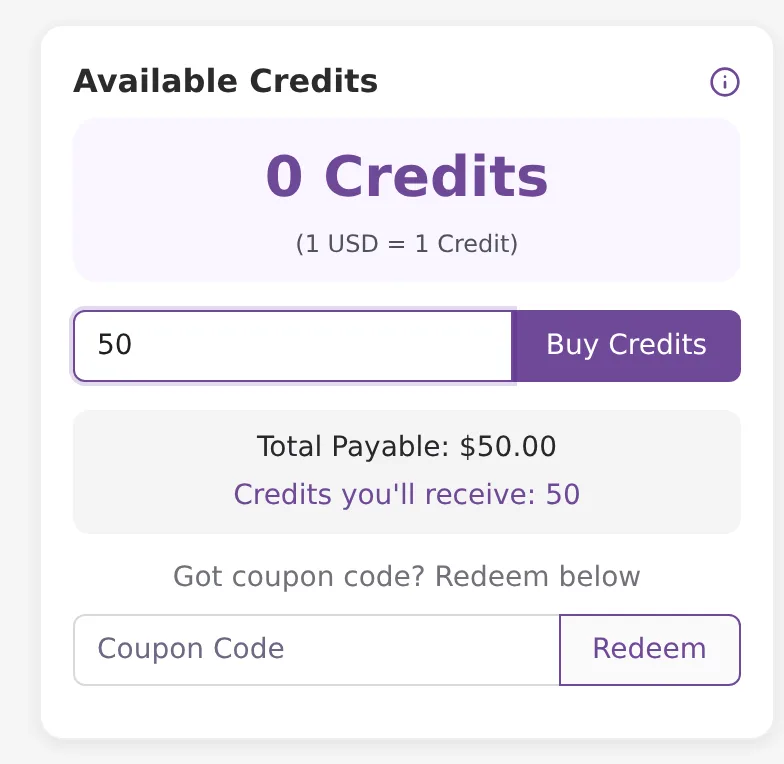
Here one credit is one US dollar. The minimum is $10, no GST is added, and you pay with PayPal. For $50 you pay $50.00 and get 50 credits.
Redeem a coupon
- Under "Got coupon code? Redeem below", type the code in Coupon Code.
- Click Redeem. The credits are added to your balance.
Every purchase and coupon shows in your wallet ledger.
Event packs
Without a subscription, you buy space one event at a time. Further down Home, PURCHASE EVENT PACK lists the packs. Each is valid for 12 months from the day you create the event with it. Unused packs do not expire. Click Add to Cart on the one you want.
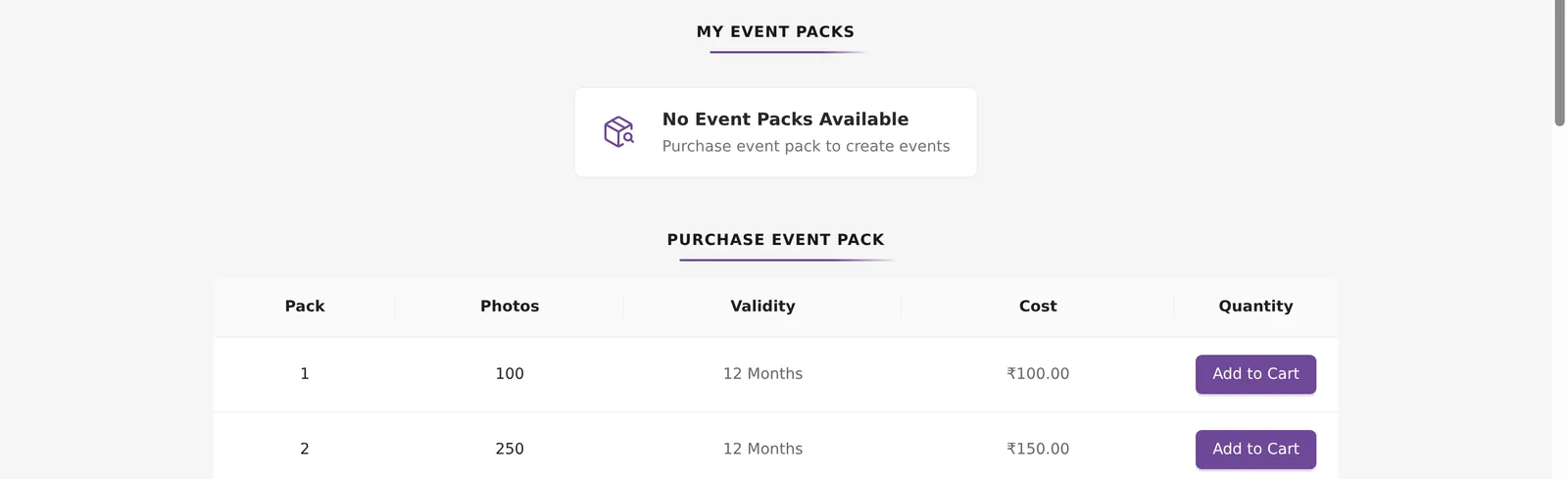
In India, packs run from 100 photos for ₹100 to 10,000 photos for ₹3,500 (250 for ₹150, 500 for ₹350, 1,000 for ₹700, 2,000 for ₹1,000, 3,000 for ₹1,350, 4,500 for ₹2,000, 6,000 for ₹2,500). Outside India they cost $5 for 100, $10 for 250, $15 for 500, $30 for 1,000, $45 for 2,000, $60 for 3,000, $90 for 4,500, $120 for 6,000 and $180 for 10,000. To add space to an event you already have, see Increase an event's photo limit.
Renew expiring events (50% bonus)
Events made from a pack expire 12 months after you create them. When some are expired or close to it, Home shows a banner such as "You have 28 events that are expired or expiring soon!" with a 50% BONUS ON RENEWAL tag. A second banner may show events whose face recognition is expiring, tagged RENEW BEFORE EXPIRY 50% OFF.
- Click View Details on the banner. A window lists each event with its status (for example "Expires in 30 days").
- Choose Renew to pay yourself, or Share Renewal Link to let your client pay.
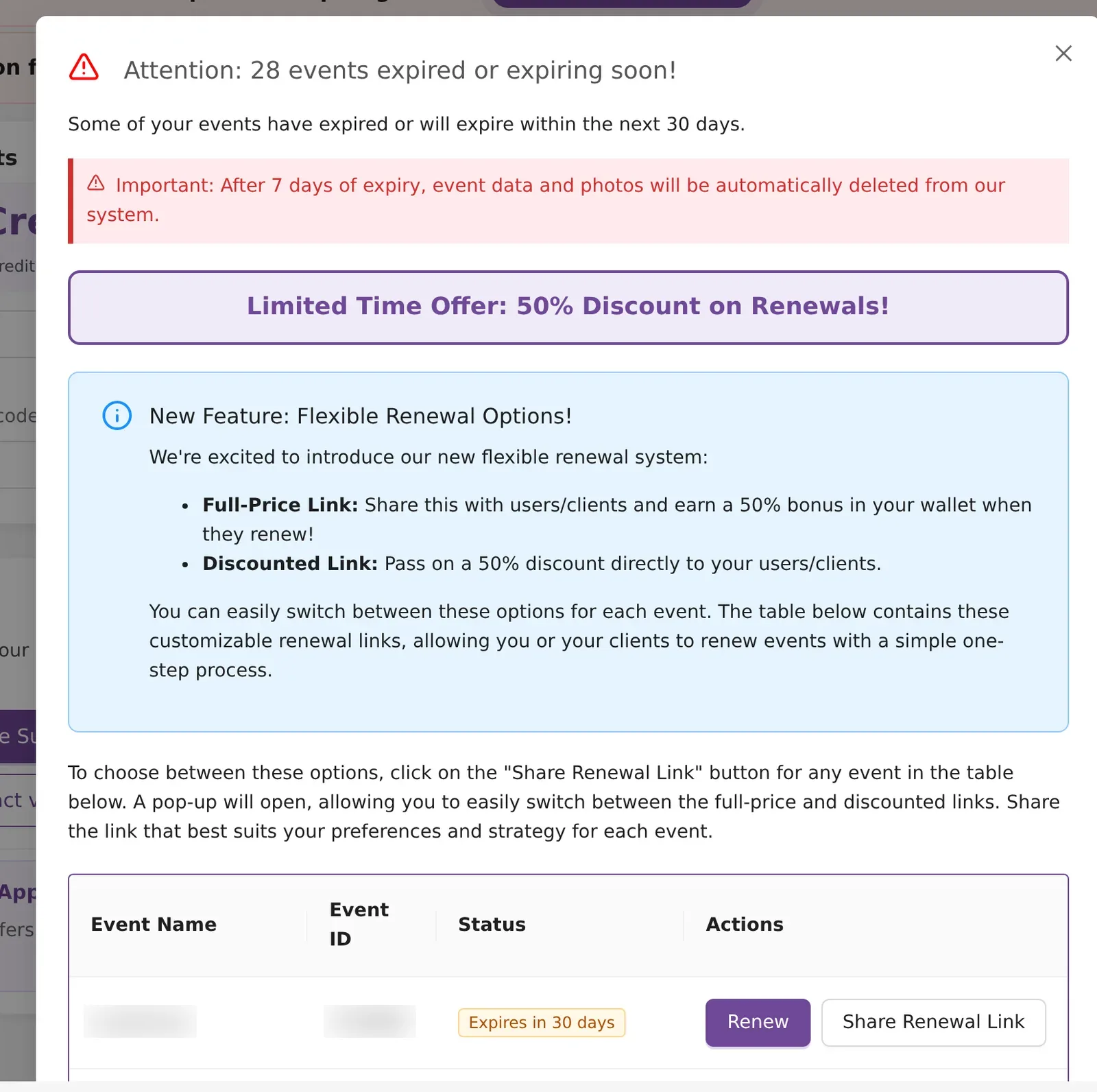
Renewing from the dashboard is 50% off before or after the expiry date. Face recognition is different: its 50% off applies only if you renew it on or before its own expiry date. Kamero may archive (remove) an event 7 days after it expires; renew before then to be safe. More in Event validity and expiry.
Renew it yourself
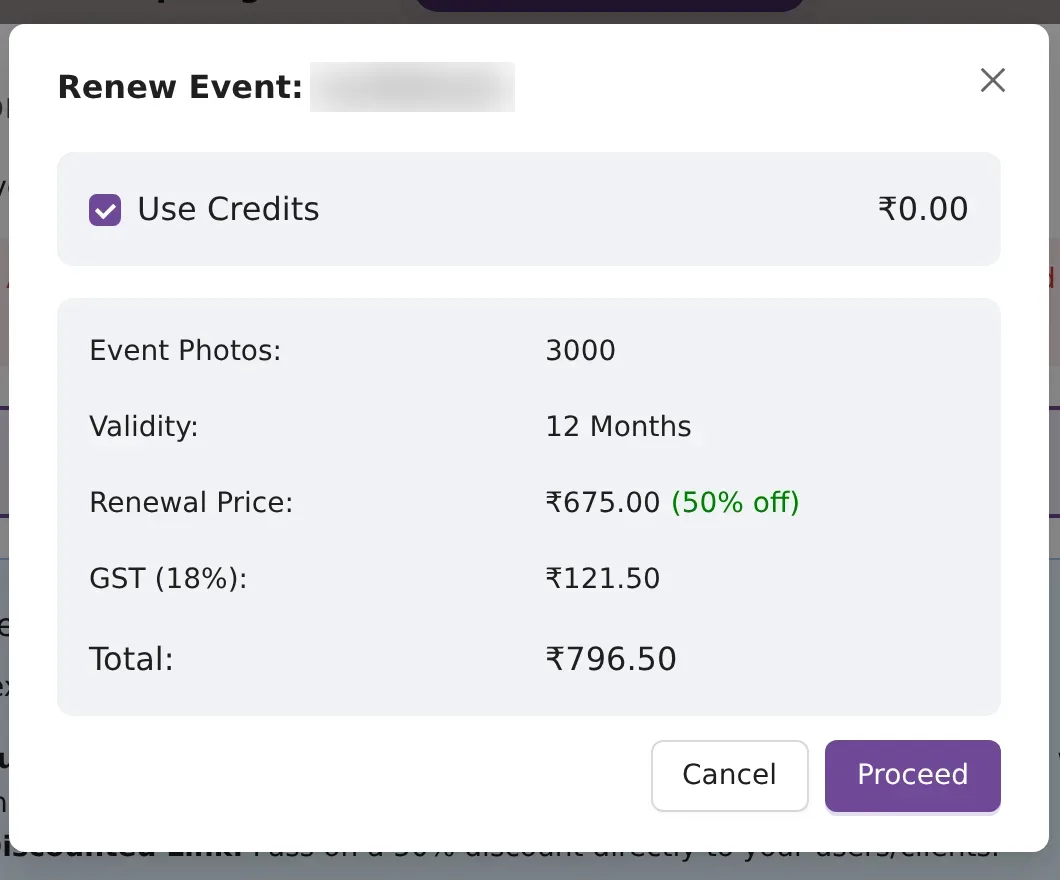
Renew opens the Renew Event window. It shows the event's photo count, the 12-month validity and the price at 50% off. For a 3,000-photo event that is ₹675.00 + ₹121.50 GST = ₹796.50. Tick Use Credits to pay from your wallet, then click Proceed.
Send your client a renewal link
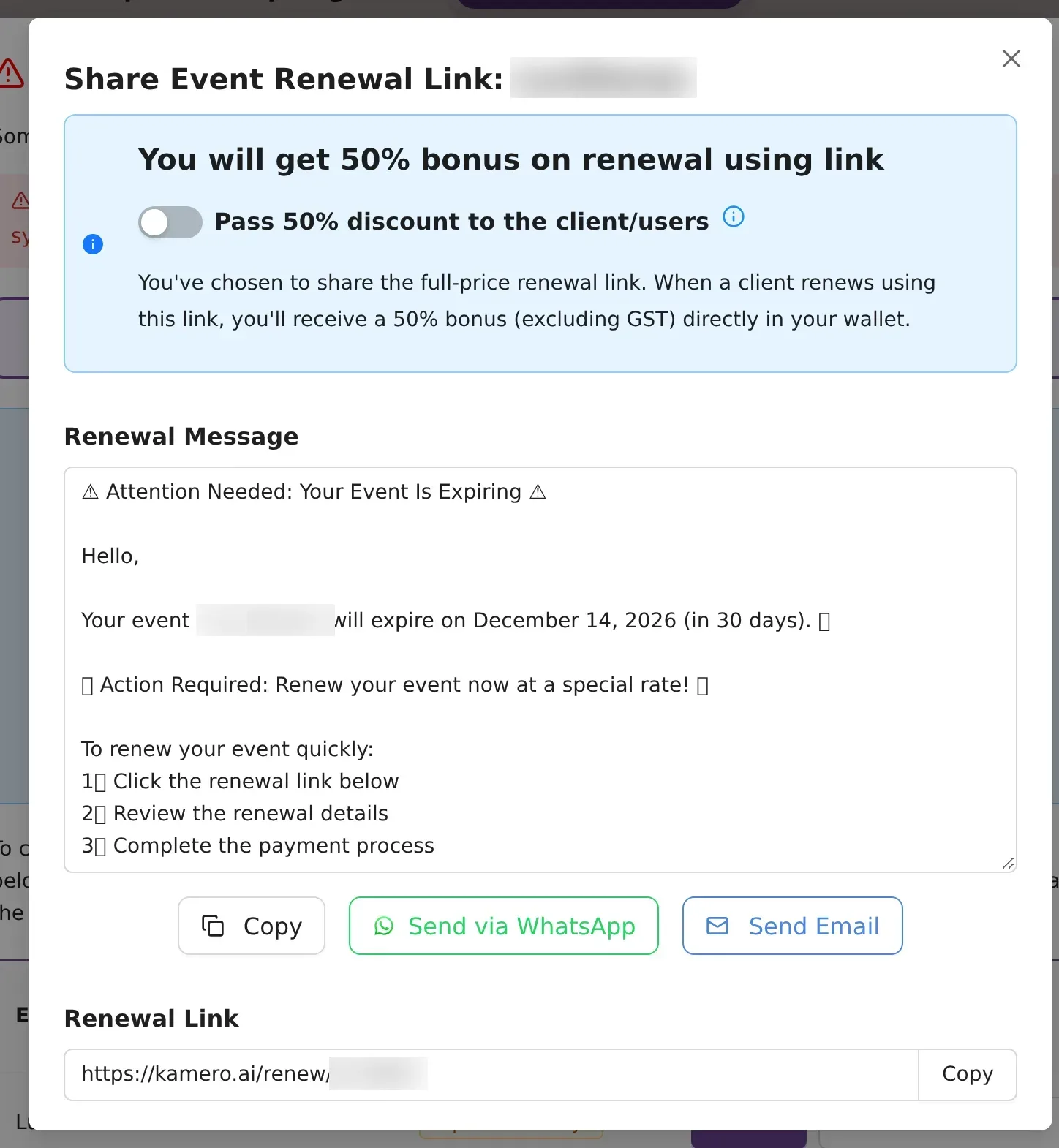
Share Renewal Link gives you a link like kamero.ai/renew/<event ID> that your client opens to pay. You pick one of two ways:
- Full-price link (switch off): the client pays full price and 50% of it (excluding GST) goes into your wallet as a bonus.
- Discounted link (turn on Pass 50% discount to the client/users): the client pays half price and you get no bonus.
Edit the Renewal Message if you like, then send it with Copy, Send via WhatsApp or Send Email.
Find your invoices
- Open My Orders from the Orders icon.
- Each payment is a card with its status (Completed, Pending or Failed), date, gateway and amount. Subscription orders start with BO-SOR (Razorpay) or BO-SOPP (PayPal).
- Click Invoice to download it, or View Details for the full order. On a Pending order, Refresh Status checks with the gateway again.
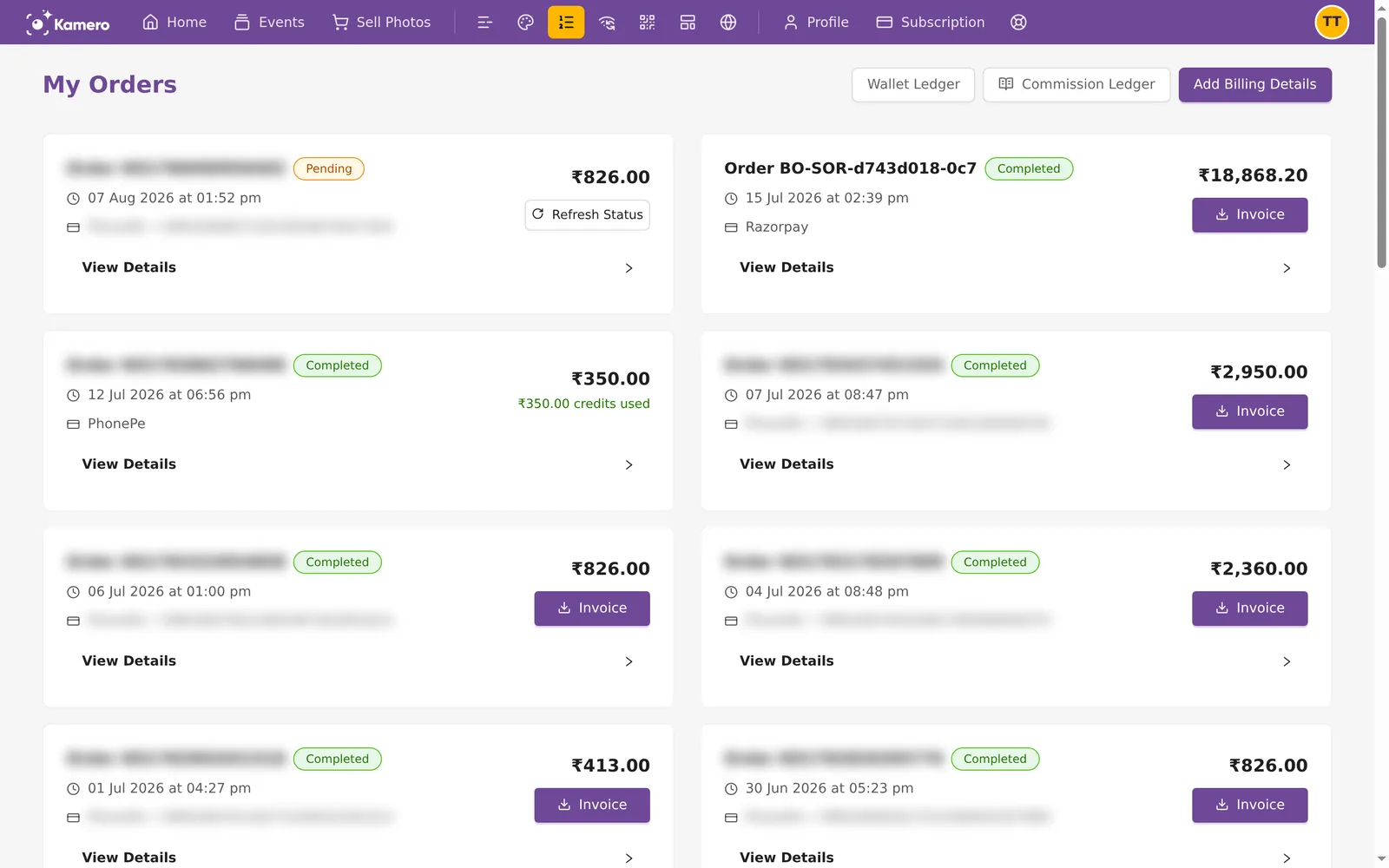
Want a GST invoice with your business name? Click Add Billing Details before you pay. The same button is on the Subscription page. More on this in Orders and invoices.
Common problems
- The order stays Pending. Click Refresh Status on the order. If the money left your account and it still shows Pending, contact support with the order ID.
- I see the wrong currency. Prices follow the country you are browsing from. A VPN can change it.
- Available is lower than I expected. Open How available uploads are calculated. Deleted photos and original files (counted twice) are the usual reasons.
- I can't see Quarterly or Monthly when upgrading. When you upgrade, only your current billing cycle and longer ones are shown. A yearly subscriber sees only Yearly. Monthly is offered outside India only.
Once your plan is active, start adding photos with Upload photos from the web dashboard.
Frequently asked questions
Do the bigger plans have more features?
No. Every plan includes every feature. The plans differ only in how many photos you can upload in a year: 50,000 on Starter, 1,00,000 on Basic, 2,50,000 on Pro, 5,00,000 on Business and 10,00,000 on Enterprise.
If I pick Monthly, is my plan monthly?
No. Every subscription runs for a year, and your upload limit resets every 12 months. Monthly and Quarterly only split the yearly price into smaller payments.
Why does one original file use two uploads?
Original files (RAW or full-resolution) take more storage, so each one counts as two uploads against your limit. A standard photo counts as one.
What happens if my subscription expires?
Access to your subscription events is suspended as soon as it expires. Kamero may archive (remove) an event 7 days after it expires; renew before then to be safe. Renewing brings back all your subscription events that have not been archived. The Subscription page warns you as the date gets close, so check the date there.
Does upgrading change my renewal date?
No. An upgrade keeps your current renewal date. You pay a one-time upgrade fee now, and the next renewal is charged at the full price of the new plan.
Can I pay for a plan with my wallet credits?
No. Plans are paid through Razorpay, PhonePe or PayPal. Credits pay for event packs, event renewals and face recognition.
Can I switch from INR to USD?
The currency follows the country you are in when you pay. In India you see INR with Razorpay and PhonePe. Outside India you see USD with PayPal. INR and USD credits are kept as separate balances.
More Plans, orders & billing tutorials
Try it in your dashboard
Sign in to Kamero and follow along. Questions? Raise a support ticket from the dashboard.