How to read your wallet ledger and credit history
Your Kamero wallet holds credits. In India, 1 credit is ₹1. You spend credits on photo packs, event renewals, face recognition and other orders. The Wallet Ledger lists every time credits came in or went out, with your balance before and after each one.
Where to find the wallet ledger
- On a computer: click your profile picture at the top right and choose Wallet Ledger. You can also click Wallet Ledger at the top of the My Orders page.
- On a phone: tap More in the bottom bar, then Wallet Ledger.
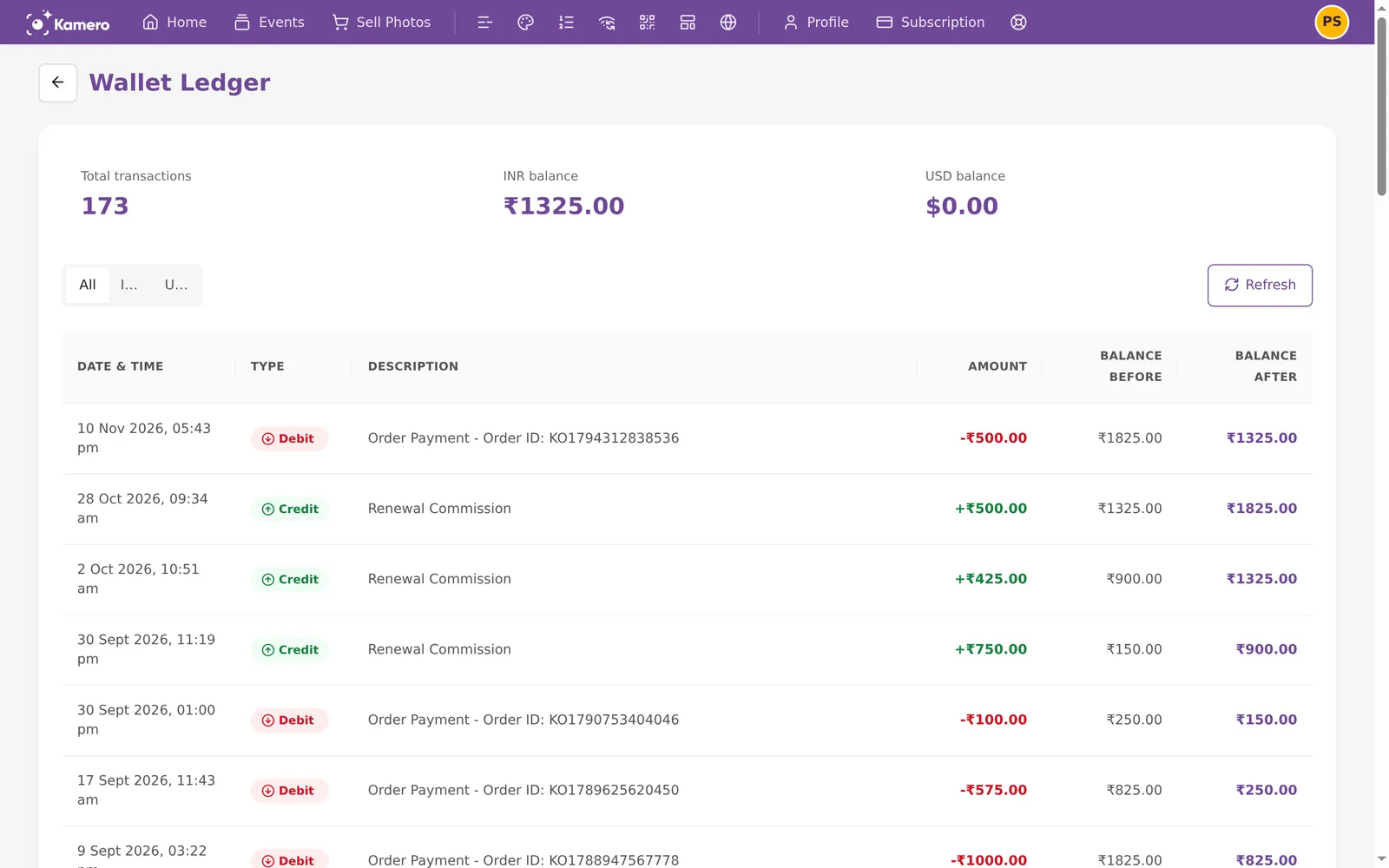
The summary at the top
- Total transactions: how many entries the ledger has.
- INR balance: the rupee credits you can spend now.
- USD balance: the dollar credits you can spend now.
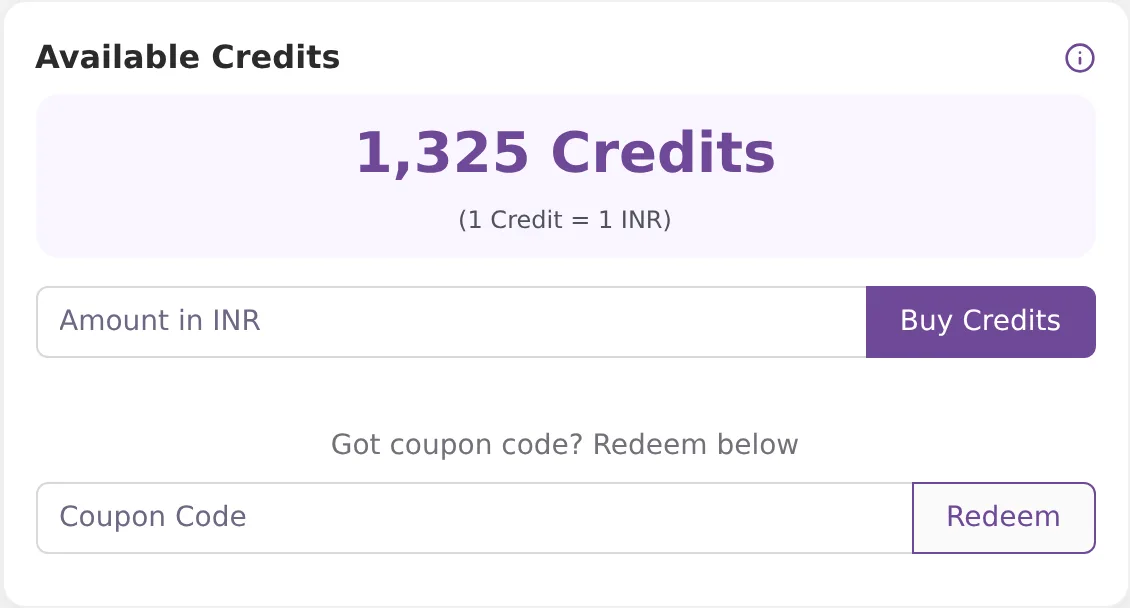
When you open the dashboard from India, the Available Credits card on your Home page shows your INR balance. Outside India the card shows your USD balance instead. See Paying from outside India.
Credits do not expire, and they cannot be withdrawn or turned into cash. On a whitelabel (team) account, everyone on the team shares one INR balance. USD credits stay on your own account.
The table
Each row is one entry:
- Date & Time: when it happened.
- Type: Credit (green) means credits were added. Debit (red) means credits were spent.
- Description: what it was for. See the next section.
- Amount: how many credits, with + or -.
- Balance Before and Balance After: your balance just before and just after this entry.
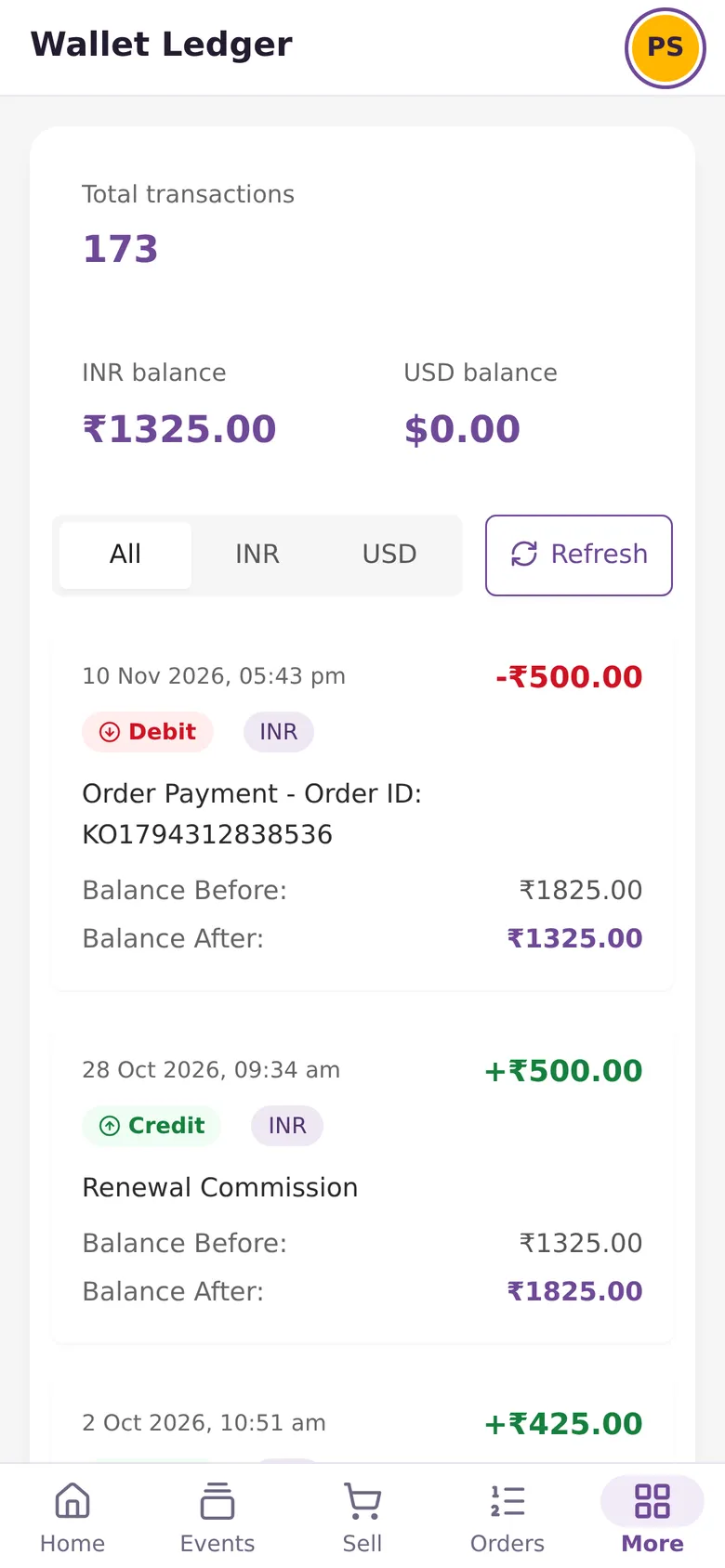
Use All, INR or USD above the table to show one currency. Click Refresh to load new entries. On a phone, each entry shows as a card with an INR or USD tag.
What each entry means
Wallet Recharge (Credit)
You bought credits. The description names the payment gateway and the order, for example "Wallet Recharge - PhonePe Order: KO...". You can find that order on My Orders and download its invoice. Older entries just say "Wallet Recharge".
In India you pay 18% GST on top when you buy credits, so ₹5,000 of credits costs ₹5,900. The ledger shows the credits you got, which is ₹5,000. In dollars, 1 USD is 1 credit and no GST is added. To claim input tax credit on what you paid, see GST invoice for your business.

How to buy credits
- Go to Home and find the Available Credits card.
- Type an amount in Amount in INR. The minimum is ₹100. In dollars, the minimum is $10.
- Click Buy Credits and finish the payment.
Order Payment (Debit)
You spent credits on an order. The description has the order ID, for example "Order Payment - Order ID: KO...". Open My Orders and look for that ID to see what you bought. It could be a photo pack, an event renewal or face recognition.
Credits do not pay for subscription plans. USD credits pay for photo packs only. Renewals and face recognition bought from outside India go through PayPal.
When you check out, Use Credits is on by default. Credits pay as much of the order as they can, and you pay the rest through the gateway. The ledger shows only the credit part.

Uploading photos does not use credits. How many photos an event can hold depends on the packs and plan you have bought. See Increase an event's photo limit to buy more space, and Usage report to see how much you have used.
Renewal Commission (Credit)
A client or guest paid to renew one of your public events. Your share of that payment is added to your wallet as credits. If you have not set a custom renewal price, your share is 50% of the base price, before GST. A renewal through the 50% discount link and face recognition renewals do not earn a commission. When a client abroad pays in US dollars, the commission is added to your USD balance.

AI Image Enhancement (Debit)
Credits spent on AI photo enhancement. The description includes the job ID.
Coupons (Credit)
To use a coupon, type it in Coupon Code on the Available Credits card and click Redeem. You see "Code redeemed!" and the credits are added. The ledger shows this as a Credit called "Wallet Recharge", with no order ID. Coupons always add INR credits, even when you redeem them from outside India.
Admin wallet adjustment (Credit or Debit)
The Kamero team changed your balance by hand. The reason follows the label. Refunds of credits show up this way. If credits were taken for an order that was then refunded, the team adds them back with an adjustment.
Paging through older entries
The table shows 50 entries per page. Use the page numbers at the bottom to go further back, or pick 20 or 100 per page.

The ledger starts on November 13, 2025. Transactions before that date are not listed.
Checking a balance you do not expect
- Find the entry where the balance changed.
- Pick INR or USD above the table. Then check that each entry's Balance Before matches the Balance After of the entry below it.
- For an Order Payment, find the order ID on My Orders. See Orders and invoices.
- If something still looks wrong, open a ticket with the date and amount. See Support tickets.
Each renewal commission is also listed in the Commission ledger. Money you earn from photo sales is not in either ledger. It is on the Seller Dashboard in Sell Photos. See Sell Photos earnings and payouts.
Frequently asked questions
Do uploads use up my credits?
No. Uploading photos does not take credits from your wallet. Credits are spent when you place an order, such as a photo pack, an event renewal or face recognition. Each of those shows in the ledger as one Order Payment line.
Why are entries before November 13, 2025 missing?
The ledger started on November 13, 2025, so older transactions are not listed. Your orders from before that date are still on the My Orders page.
I redeemed a coupon. Where is it?
A coupon adds credits like a purchase does, so it shows as a Credit entry called Wallet Recharge, with no order ID after it.
How do refunds show up?
If credits were taken for an order that was later refunded, the Kamero team adds them back by hand. That shows as a Credit entry starting with Admin wallet adjustment, followed by the reason. Money refunded to your bank or card does not appear in the wallet ledger.
Can I use my INR credits to pay in US dollars?
No. INR and USD balances are kept apart. Credits bought in rupees pay for orders in rupees, and credits bought in dollars pay for orders in dollars. Dollar credits pay for photo packs only.
Does the ledger show my photo sales earnings?
No. Money from photo sales is on the Seller Dashboard in Sell Photos. The wallet ledger shows only the credits you can spend on Kamero orders, and the Commission Ledger shows renewal commission only.
Do credits expire, and can I withdraw them?
Credits do not expire. They cannot be withdrawn or turned into cash. You can only spend them on Kamero orders.
More Plans, orders & billing tutorials
Try it in your dashboard
Sign in to Kamero and follow along. Questions? Raise a support ticket from the dashboard.